











Changelog

July 1, 2026

Ask anything about an incident, right in the web app.

Ask anything about an incident, right in the web app.

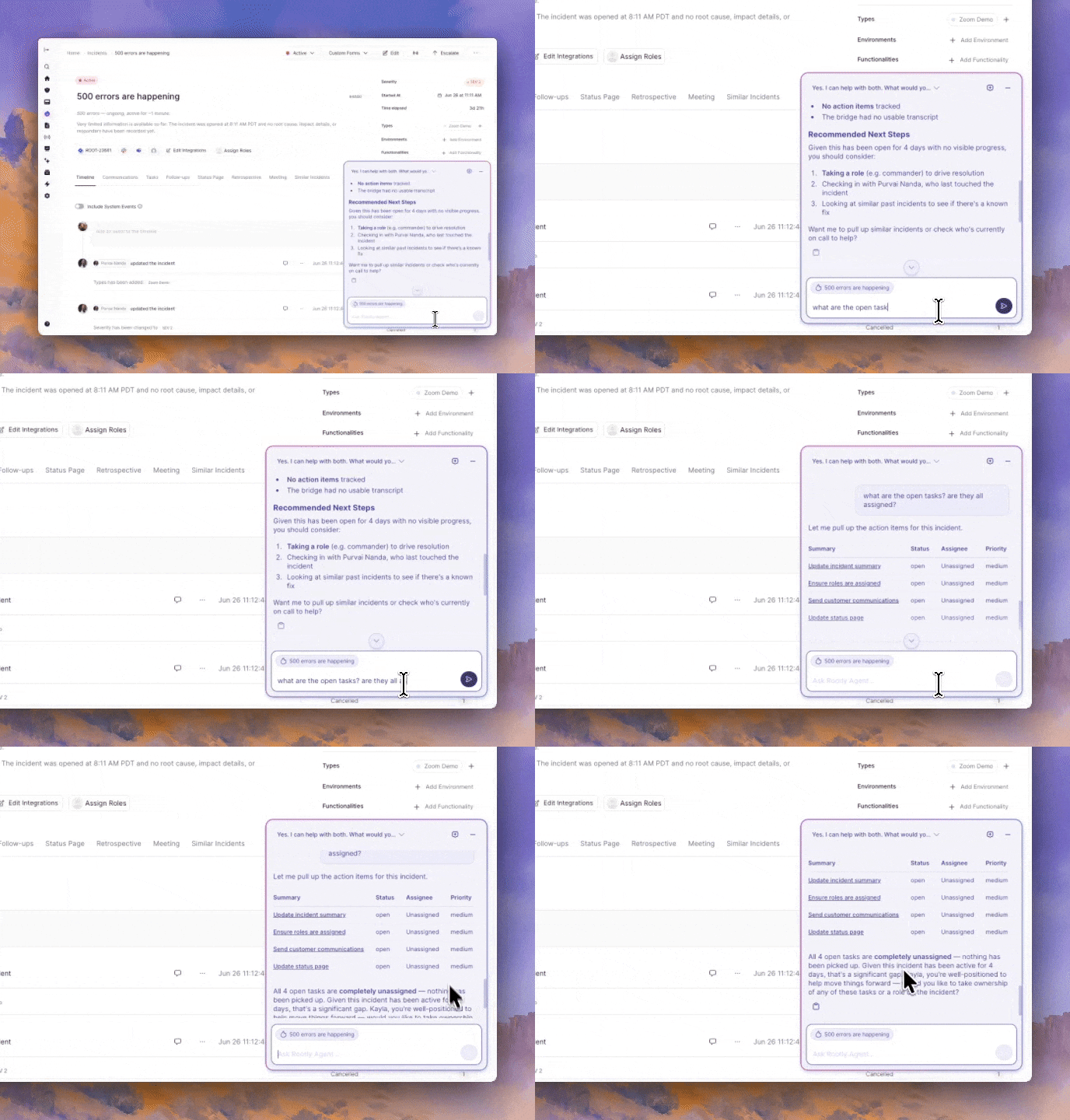
Rootly Agent is now built into the web app. Open the chat panel from any incident and ask questions in plain language, and it answers using that incident's live context: timeline, severity, status, roles, alerts, and linked data. You get grounded answers without piecing them together yourself.

Use it to get caught up, see who is doing what, understand why an incident is a given severity, review what has been tried, or draft communications for different audiences. If Rootly Meeting Scribe captured the bridge call, you can ask for a recap of what was discussed. Replies stream in as they are generated and are formatted in markdown, with a copy button so you can drop a drafted update straight into Slack, email, or a doc.
What's included

  • A chat panel on every incident page, docked alongside the incident so the rest of the page stays usable
  • Suggested prompts to get started, plus natural follow-up questions that keep their context
  • Answers grounded in live incident data: timeline, severity, status, roles, alerts, and linked records
  • Drafting help for status updates, executive summaries, and customer messages
  • Multiple chats per incident with automatic naming and history, private to you
  • Times shown in your team's time zone by default, with on-demand conversion to UTC or another zone

Why it matters

During an incident the context you need is scattered across the timeline, the alerts, and the bridge call. Rootly Agent brings it into one place and answers in plain language, so responders spend less time hunting for status and more time resolving the incident. On the web it is read-only today; to page, change status or severity, or manage action items, use @Rootly in Slack or the incident page directly.

Getting started

Rootly Agent in Web is available to all customers and can be turned on by an Admin under Configuration → Rootly AI. Using the panel requires an Incident Response seat. See the documentation to learn more.

What else shipped

Improvements

On-Call

  • You can now choose a Slack channel from any connected workspace when configuring an escalation policy, not just your default workspace.

Incident Response

  • Catalog item custom property values can now be referenced in Liquid, so workflows and templates can pull service-specific data.
Terraform
  • Updating a service or functionality through the API or Terraform no longer clears its ServiceNow CI sys ID when that field is left out of the request.
  • Read-only users can no longer create coverage requests for other users' shifts through the API, matching the web app's permission rules.
Fixes

On-Call

  • Long alert field values no longer push action buttons out of view in Slack alert notifications.
  • Slack custom form modals no longer fail when a form includes a decimal number field.
  • Turning on "Include shadows in Slack notification" without choosing a channel no longer silently resets while reporting success.
  • Slack alert delivery failures caused by invalid attachments now appear in the alert timeline.

Incident Response

  • Microsoft Teams SSO sign-in no longer returns a 404 when a user's Azure AD domain differs from their email domain.
  • The Liquid slack_message_url variable now links to the specific Slack message instead of only opening the channel.
  • Long incident titles no longer overflow their container on the status page.
  • Web and in-app AI suggestions are no longer turned off when the Slack AI assistant toggle is off.
  • Team member search now ignores accents, so accented names are found just like on the Members page.
  • Exporting a timeline to Notion no longer fails the entire export when a single link is malformed.
  • Opening the Configure page for a Google Directory Sync service-account connection no longer returns a server error.
  • The "Newly Attached Teams" paging action now works for teams attached through Slack, not just the web UI.
  • Multi-select field values now appear in the condition value dropdown when setting up display or required rules.
  • Turning on Edge Connector now grants Owner-role permissions on teams created after January 2026.

You and your teams deserve
modern incident management.

Get a 1:1 demo with one of our technical staff or start your free 14-day trial.