











Changelog

July 28, 2026

Rootly AI now gathers incident evidence across your entire stack.

Rootly AI now gathers incident evidence across your entire stack.

Query the tools your team uses to help investigate an incident, generate a timeline, or keep your stakeholders up to date, all without ever having to leave your incident channel.

Rootly AI has always been able to reason with the data inside Rootly to help respond to incidents: alerts, past incidents, and retrospectives. Now, AI Connectors extend that reach to your third-party sources in real time. Ask a question with @Rootly, and it will gather live evidence from your observability, code, infrastructure, feature flag, ticketing, and documentation platforms alongside your incident data to support your investigation.
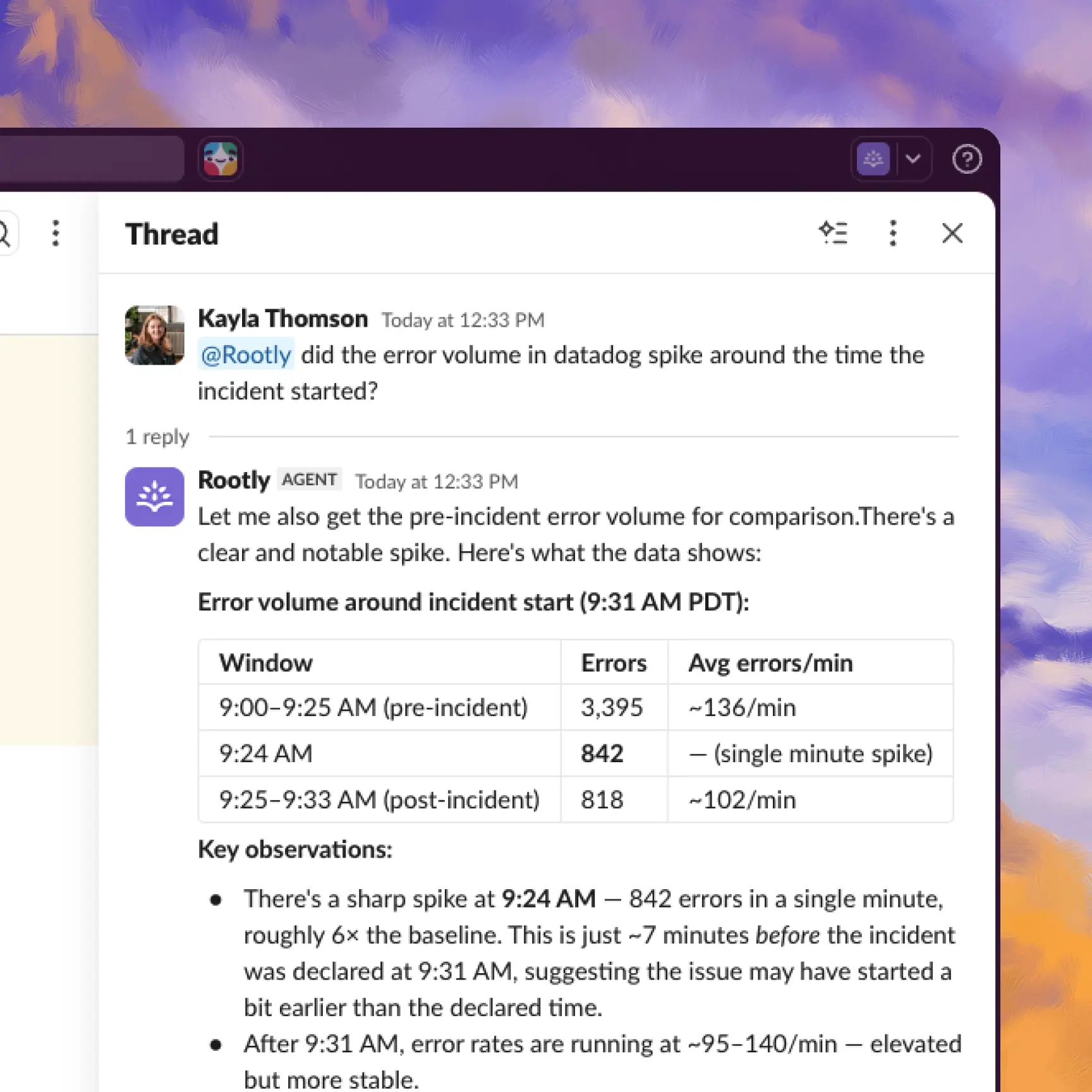
Rootly's AI Agent in Slack using the DataDog connector to help investigate an incident.

Use Rootly's AI Agent, powered with AI Connectors, to answer questions like:

  • What are the logs showing since the incident was detected?
  • Which PR's have shipped right before the incident started? Include a link and the test results.
  • Which LaunchDarkly feature flags were gating this feature? Which customers have access to that feature?
  • What's the EC2 and RDS state in AWS?
  • What's the next step in the runbook for this kind of incident?

Answering "what changed right before this broke?" usually means an engineer hopping across half a dozen tabs. With AI Connectors, Rootly AI does that gathering itself and hands the responder the evidence in one place, with every conclusion linked back to queries the engineer can open and re-run.

What's included

  • One-click OAuth connectors: Sentry, GitHub, Atlassian (Jira and Confluence), Notion, Linear, LaunchDarkly, Braintrust, and Cloudflare (fourteen surfaces including DNS, Workers, Zero Trust, and Radar)
  • Short setup: AWS (IAM Role via CloudFormation, Terraform, or manual, with optional EKS), Datadog, Grafana Cloud, Grafana Managed, New Relic, and Semaphore
  • Custom connectors: point Rootly AI at any OAuth-based MCP endpoint with an allowlist of tools it can call

Every connection is read-only, with no exceptions. Rootly AI queries at investigation time only, never on a schedule, and doesn't keep a copy of the underlying data. Credentials are stored encrypted.

Why it matters

Cross-tool investigation knowledge tends to concentrate in a few senior engineers, and incidents pull them in no matter who is on call. When Rootly AI gathers the diff, the flag audit history, and the infrastructure state itself, more incidents resolve with the first responder, and the engineer holding the pager at 3 AM starts from the same evidence a staff engineer would have assembled.

Set up connectors in AI Connectors. Full setup guides in the docs.
What else shipped

Mobile app
Improvements

On-Call

  • Alerts that arrive on an alert source's resolve path now apply the source's default alert field mappings.
  • Organizations can now customize the message shown when the /rootly page Slack command is turned off.
  • Slack notifications for coverage requests now show times in the schedule's timezone instead of the organization's timezone.

Incident Response

  • Jira workflow actions now retry automatically when Jira responds with a rate limit error.
  • Teams that own a functionality are now attached to an incident automatically when the functionality is added.
  • Dropdown pickers in the retrospective editor now load large option lists faster.
  • Meeting recording retention for the Rootly scribe bot can now be configured per organization.
  • New workspaces no longer start with a set of default workflows, keeping setups clean from day one.
Terraform
  • The Terraform visualizer no longer shows business hours on escalation policies that do not use them.
  • Setting the same position on multiple schedule rotations from Terraform now returns a clear error instead of being accepted silently.
Fixes

On-Call

  • Slack channel pickers now let you choose a workspace inline on Slack Enterprise Grid, instead of only listing the globally selected workspace.
  • Team admins can now add holiday calendars to schedules.
  • Shadow on-call users are now included in Slack user group sync when shadow notifications are enabled.

Incident Response

  • Deleting a service or functionality no longer fails when it is attached to a deleted status page.
  • Preferred names longer than 50 characters no longer break SCIM provisioning.
  • Users with full team permissions can now add team admins.
  • Team admins and team-scoped API keys can now create services.
  • Fixed SCIM service account provisioning failing on well-formed email addresses.
  • RSS feeds are now hidden on private status pages.
  • Workflows set to continuously repeat with an inactivity condition now fire when the inactivity window is longer than the repeat interval.
  • The Slack permissions request dialog now opens even when a pending request has no permissions attached.
  • Slack channel syncing no longer stalls when an archived channel reappears.

You and your teams deserve
modern incident management.

Get a 1:1 demo with one of our technical staff or start your free 14-day trial.