









.svg)







.png)
You can now run Rootly AI inside private incidents, giving your most security- and risk-conscious workflows access to the same AI accelerators you use elsewhere. That means features like /rootly catchup in Slack and AI summarization suggestions on web are available even when an incident is locked down—so you don’t have to choose between confidentiality and speed.
Why it matters
Private incidents are often your highest-stakes events: security issues, customer escalations, legal/compliance situations, or anything needing tightly controlled access. Until now, teams running private incidents had to forgo AI features to preserve data boundaries. With this release, you can keep incidents private and still benefit from fast, continuously updated context—cutting triage time and reducing responder load without expanding visibility.
How it works
- Opt-in only: Rootly AI in private incidents is disabled by default.
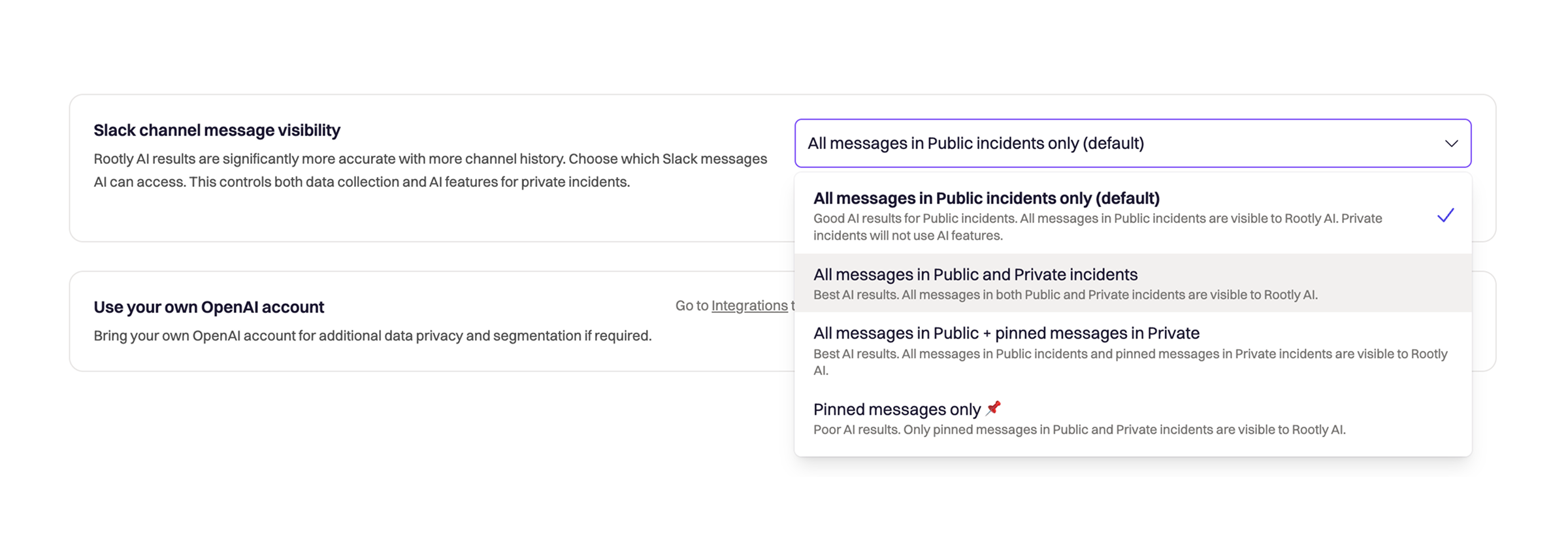
- Enable in AI settings: Go to Rootly AI Configuration and turn it on under Slack channel message visibility. Once enabled, AI can operate within private incidents according to your chosen visibility rules.
- Same AI steps, same guardrails: AI behaves the same as in public incidents—summarizing activity, generating catchups, and suggesting updates—while respecting private-incident access controls.
Check out the AI docs and the private incident docs to get started and learn more.