








.svg)







.png)
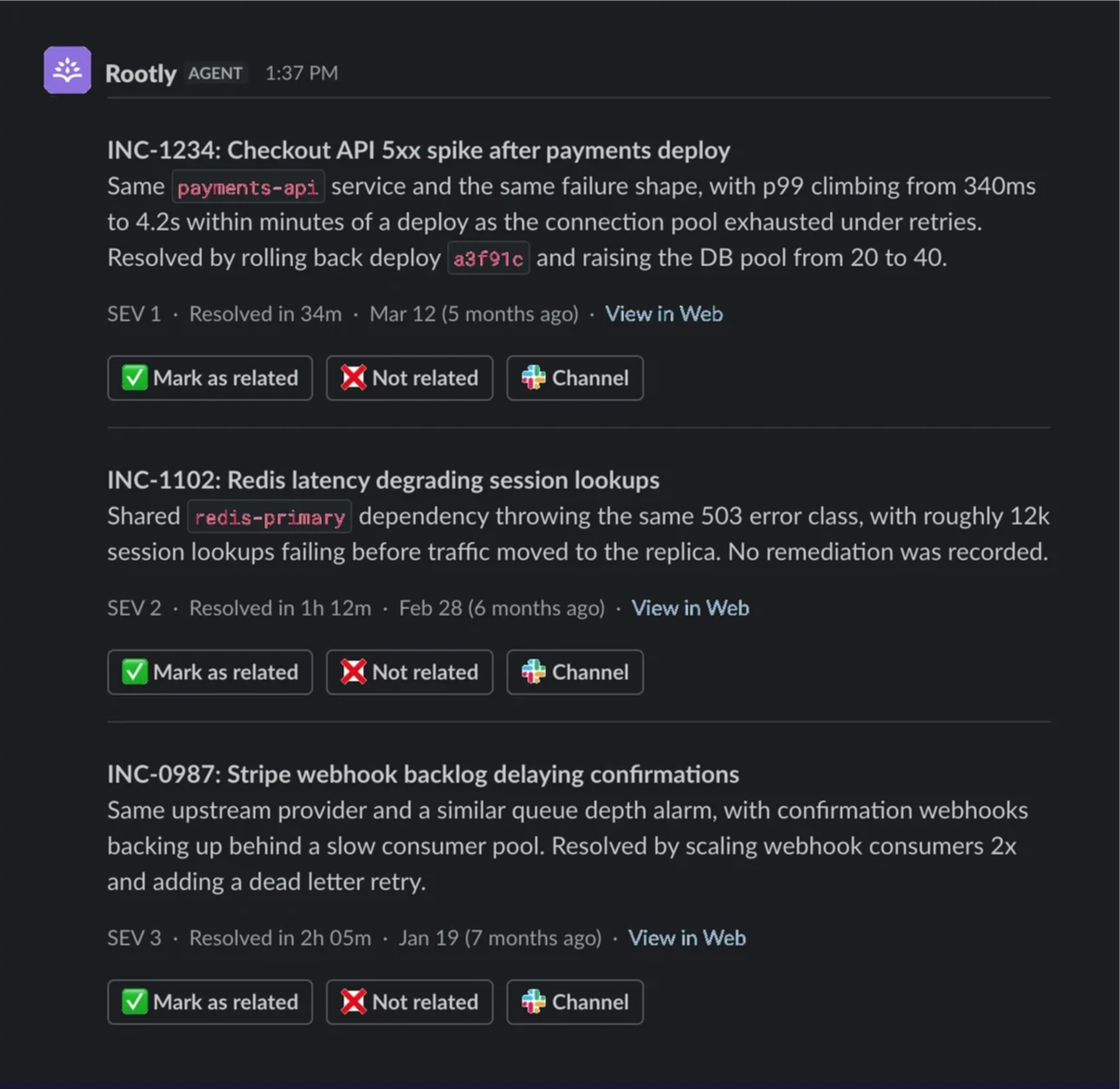
Rootly's agent now posts the most closely related past incidents directly into the incident channel in Slack. Nobody has to ask for it. Each match arrives with the reason it is relevant, how severe it was, how long it took to resolve, and a link back to the original incident.
Rootly keeps looking on your behalf. As an incident opens, the agent searches your incident history in the background and, when it finds one that is genuinely relevant, shares it with the response team on its own. Nobody has to stop and run the search, and nobody has to already know what to search for.
You get at most three matches in a compact message that threads the details, so the incident channel stays readable, and the card can be dismissed when it isn't useful.
What's included
- Related past public incidents posted automatically into the incident's Slack channel, with no prompt needed.
- Up to three matches per message, each showing why it was matched — the same service, a similar kind of failure — along with severity and time to resolve.
- Links back to the full incident, so anyone can read the original response without leaving Slack.
- A compact message that threads the details, keeping the incident channel clear.
Why it matters
Most teams have already responded to a version of the incident in front of them. That knowledge sits with whoever happened to be on that response, and in write-ups nobody thinks to search at 3 AM. The person holding the pager tonight is usually not the person who solved it last time.
Putting the match in the channel closes that gap. Responders start from what the last team learned — what it was, how bad it got, how long it took, how it was fixed — instead of spending the first stretch of the incident searching for it. Less time on research, more time on the fix, and a shorter path to mitigation.
“Rootly's proactive related incidents detection replaced hunting through old postmortems to figure out the last time an incident happened, saving us time and keeping our attention on the fire at hand!”
— Mark Shaw, Faire Engineering
Related Incidents are available now in your AI & Agent settings. If you've previously opted into AI features, you already have this turned on! Learn more in our Help Docs.