











Changelog

May 20, 2026

Paging based on Functionalities.

Paging based on Functionalities.

Functionalities can now be paged directly from the manual paging modal on web, Slack, and mobile. Assign an escalation policy to any Functionality and it becomes a pageable target, so anyone responding to an incident can escalate to the right team based on what’s broken, without needing to know the underlying team structure or escalation policy name.

Why it matters

Most people paging on-call responders think in terms of product areas and features, not the team names or escalation policy hierarchies behind them. The person raising the alarm knows that “login is broken for 1% of users” but doesn’t know whether to page the Identity team, the Auth service, or escalation policy “Platform-P1.” This knowledge gap results in delayed pages, mispages, or a “please join which channel?” loop before any investigation starts.

Paging by Functionality closes that gap. Admins map Functionalities to escalation policies once. Everyone else just searches for what’s impacted.
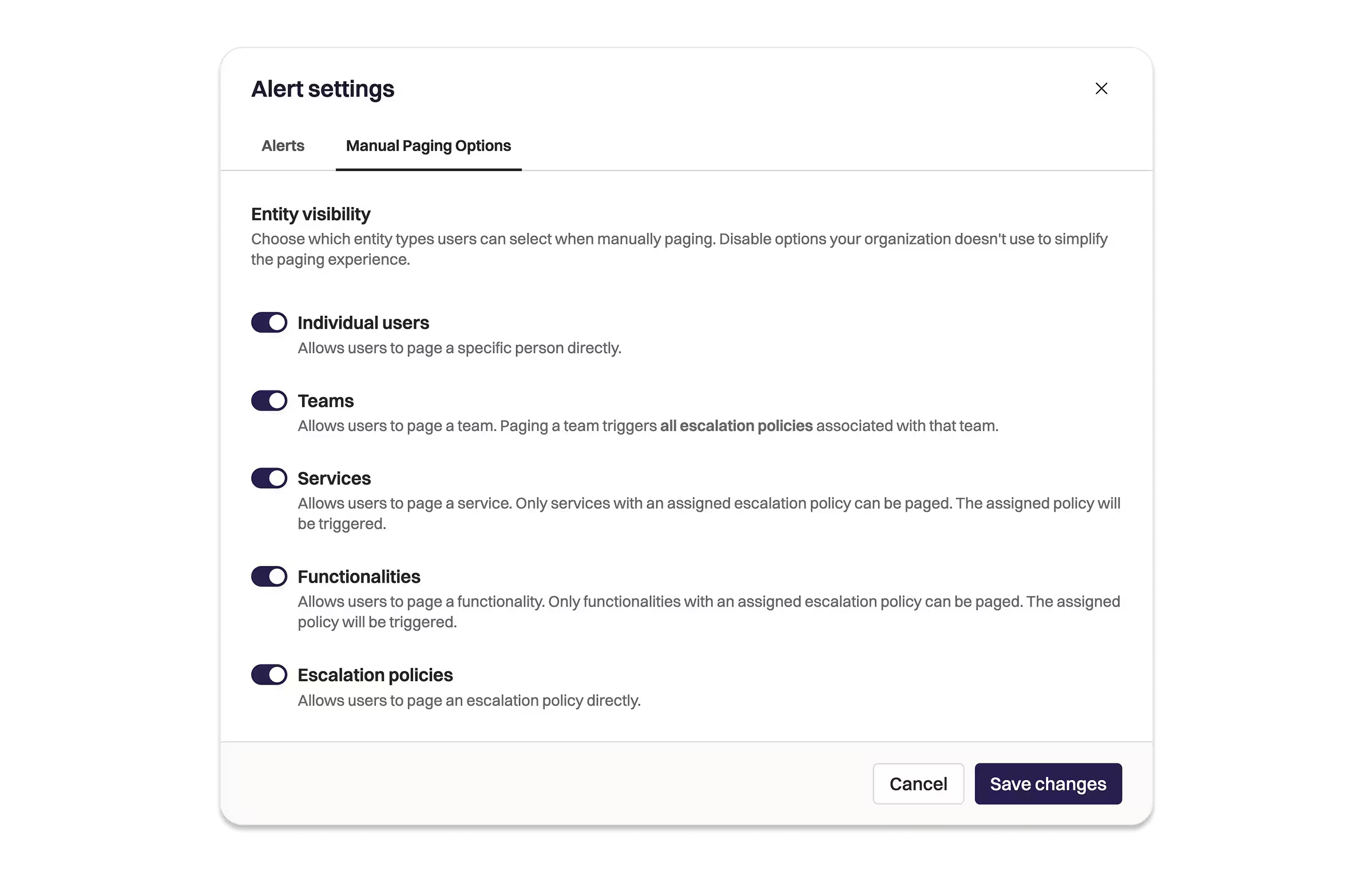
Enabling Paging by Functionalities UI.

How it works

Assign an escalation policy to a Functionality from the Functionality overview page or via API and Terraform. Once assigned, that Functionality becomes a pageable target alongside Teams, Services, and Escalation Policies in the paging modal.

  • Responders see the Functionality name in their page notification, push, SMS, and phone alerts, so they immediately know the business context of what they’re responding to.
  • The Alert’s Functionality field is updated automatically and a timeline event is logged when a Functionality is paged.
  • If a Functionality is owned by a team, that team is added to the alert at page time.
  • Functionalities without an assigned escalation policy are not shown as pageable options.
  • Functionality paging is also available as a target in the “Page Rootly On-Call” workflow action.

Getting started

  1. Go to a Functionality and assign an escalation policy under the On-Call section.
  2. The Functionality will now appear as a pageable option in the paging modal on web, Slack, and mobile.
  3. Functionality paging is also supported via API (POST /pages with functionality_id) and Terraform via the updated rootly_functionality resource.

Check out the docs to learn more.

What else shipped

Improvements

On-Call

  • Schedule sort preference (by name, created date, etc.) now persists between sessions, matching the behaviour of other sortable views like Alerts.
  • Audible notification profiles now allow non-audible notification methods in intermediate escalation levels, giving more flexibility when configuring multi-step audible escalation sequences.

Incident Response

  • Users can now be assigned incident roles on private incidents without needing full read and update permissions; the assign_incident_roles permission now works independently for private incidents.
  • The HTTP Client workflow action now retries automatically on transient errors, including rate limit responses (HTTP 429), using exponential backoff. Previously, each HTTP Client action was a single attempt with no retry.
  • Rootly incidents and alerts now surface as Slack Work Objects in Slack’s native interface, giving teams rich, interactive representations of Rootly work items directly in Slack.
API

On-Call

  • Escalation policy listing endpoints now return deferral paths alongside standard escalation paths. Both GET /v1/escalation_policies/:id/escalation_paths and GET /v1/escalation_policies/:id?include=escalation_paths previously omitted deferral-type paths entirely.
  • GET /v1/alert_events no longer exposes internal user attributes. The endpoint previously returned full serialized user objects including session tokens and other internal fields.
MCP Server
  • Hosted MCP transports now require Bearer authentication. Unauthenticated requests are rejected before any tool dispatch, and tokens are validated against the Rootly API at the edge so malformed or expired credentials surface immediately with clear errors.
  • get_alert_by_short_id is now an O(1) point lookup. The previous implementation scanned up to 20 pages sequentially.
  • get_oncall_handoff_summary and five shift-related tools (list_shifts, get_oncall_schedule_summary, check_responder_availability, create_override_recommendation, check_oncall_health_risk) now fetch data concurrently.
  • get_oncall_shift_metrics no longer silently drops schedules whose teams appeared past page 1 of the teams listing. All schedules are now considered when filtering by team.
  • Paginated fan-out calls are now resilient to transient errors on individual pages, a single failed page fetch no longer aborts the entire response.
Fixes

On-Call

  • IR-only customers can now create and save alert filter views without encountering a permissions error.
  • Deferred alerts now tag the owning team at alert creation time, ensuring the team’s default Slack channel receives a notification when the alert arrives, not only when the deferral window ends.
  • The “Next on-call” label on schedule index cards now correctly shows the user whose shift resumes after an active partial override expires, rather than the next user in the rotation.
  • Editing the user list on a biweekly rotation no longer truncates the in-progress shift or creates coverage gaps.
  • The escalation policy search input now responds immediately in Safari and Chrome without a focus delay.
  • Slack channels now appear consistently across all dropdowns, including escalation policy notification targets, when the channel is visible in the Slack Announcements selector.

Incident Response

  • Status page email subscription confirmation links now point to the domain the subscriber actually visited when multiple custom domains are configured.
  • The Jira integration no longer overwrites incident titles during background sync when the Jira issue title differs from the Rootly incident title.
  • Catalog form fields with an entity type no longer throw a 500 error when rendered in an incident form.
  • Zoom integration no longer sends false-alarm connection error emails when the integration is correctly configured and connected.
  • Custom domain status pages no longer return 404 for orgs with a single active custom domain.
  • The “mark as private” visibility checkbox on private incident form fields now appears consistently on both web and Slack for the same user.

You and your teams deserve
modern incident management.

Get a 1:1 demo with one of our technical staff or start your free 14-day trial.