








.svg)







.png)
When an incident ends, the real work begins. Teams need to document what happened, analyze root causes, and create action items to prevent future issues.
At Rootly, we found ourselves wrestling with fragmented retrospective processes across teams: some used Google Docs, others defaulted to Confluence, and many simply skipped retrospectives altogether.
The solution we built combines:
- Real-time collaborative editing
- AI-powered writing assistance
- And, seamless integration with existing workflow systems.
Here's how we created a retrospectives system that teams actually want to use.
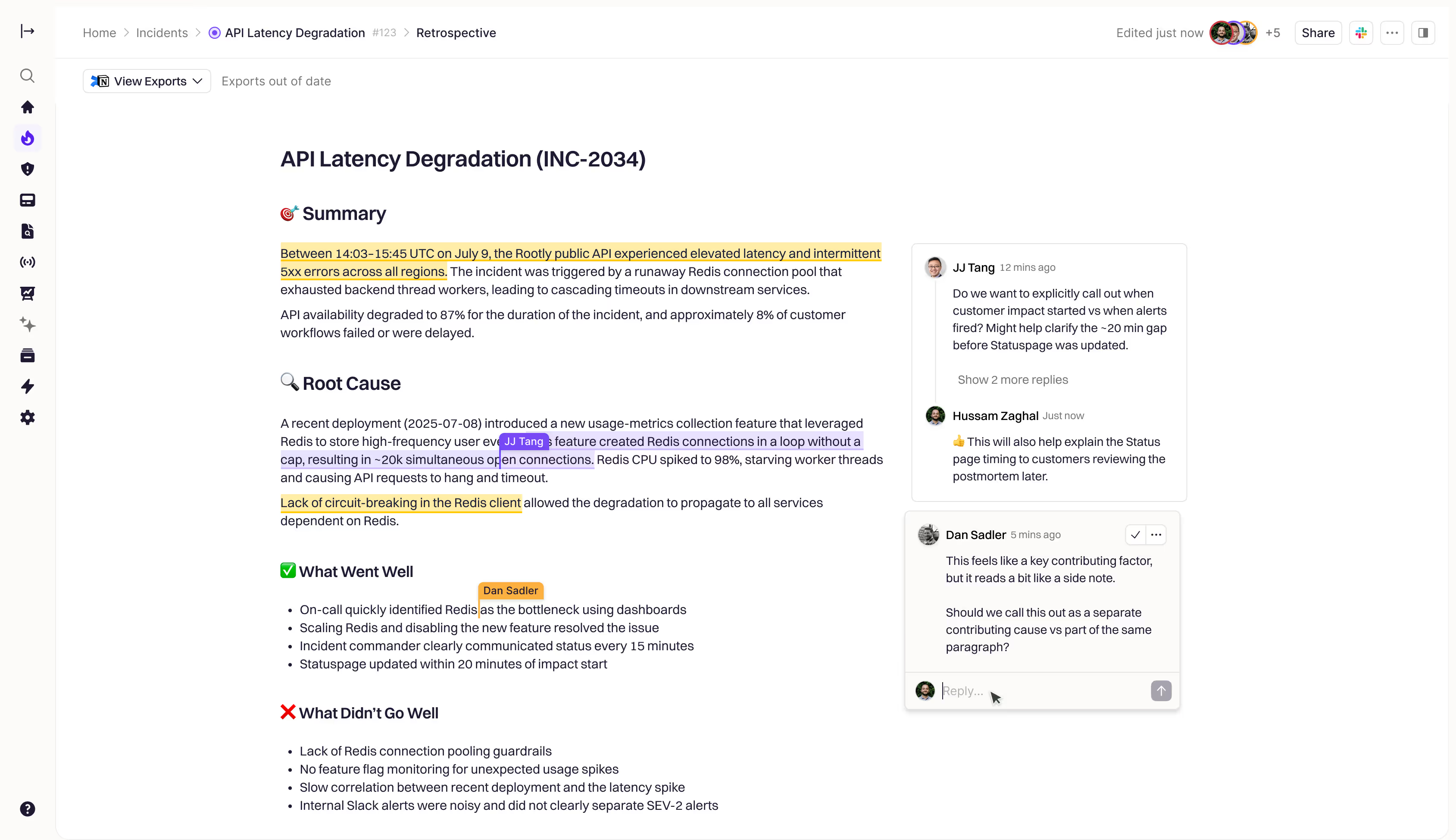
Before building our retrospectives feature, we surveyed our customers and found three recurring pain points:
- Manual coordination overhead: Assigning retrospective tasks, tracking progress, and sending reminders consumed hours of engineering manager time per incident.
- Limited real-time collaboration: Google Docs worked for basic editing, but teams needed threaded comments, version history, and the ability to embed dynamic incident data directly into documents.
- Inconsistent processes: Some teams had elaborate retrospective workflows, others had none. There was no systematic way to match retrospective processes to incident severity or type.
We needed something that could automate the workflow management while providing the collaborative editing experience teams expected.
Architecture: Collaborative Editing Meets Workflow Automation
Our solution splits into four main layers:
Real-time sync layer: Conflict-free Replicated Data Types (CRDTs) handle document collaboration, while ActionCable manages live updates to incident data within documents.
Application layer: Rails controllers and Sidekiq background jobs orchestrate the retrospective workflow, from automatic step creation to notification scheduling.
Integration layer: Export capabilities to 8 platforms (Confluence, Google Docs, Notion, etc.) and AI services for writing assistance.
Storage layer: Dual content storage (HTML + JSON) to support both human-readable exports and editor state preservation.
The key insight was separating document collaboration from workflow orchestration. Our collaborative editor handles real-time editing, while our Rails backend manages the business logic around retrospective steps, due dates, and notifications.
Real-Time Collaboration with Y.js CRDTs
We evaluated several approaches for real-time collaboration: Operational Transform (used by Google Docs), event sourcing, and Conflict-free Replicated Data Types (CRDTs).
CRDTs won because they handle conflict resolution automatically without requiring a central coordination server. We went with Y.js primitives due to its ergonomics.
Here's how our collaborative editor initializes real-time editing:
// collaboration_controller.js
connect() {
  this.ydoc = new Y.Doc();
  const configMap = this.ydoc.getMap("config");

  this.provider = new CollaborationProvider({
    name: this.documentIdValue,  // "document/TYPE/ID"
    document: this.ydoc,
    token: this.tokenValue,      // JWT signed with HS256

    onSynced: () => {
      if (!configMap.get("initializedFromServer")) {
        this.syncContentFromServer();
        configMap.set("initializedFromServer", true);
      }
    }
  });
}
The Y.js document becomes the source of truth after initial sync from our Rails database. Multiple users can edit simultaneously, and the CRDT algorithms merge changes without conflicts.
Hydrated Liquid Variables: Live Data in Documents
Static templates weren't enough. Teams wanted to reference live incident data - timeline events, affected services, MTTR calculations - that could update automatically as the incident evolved.
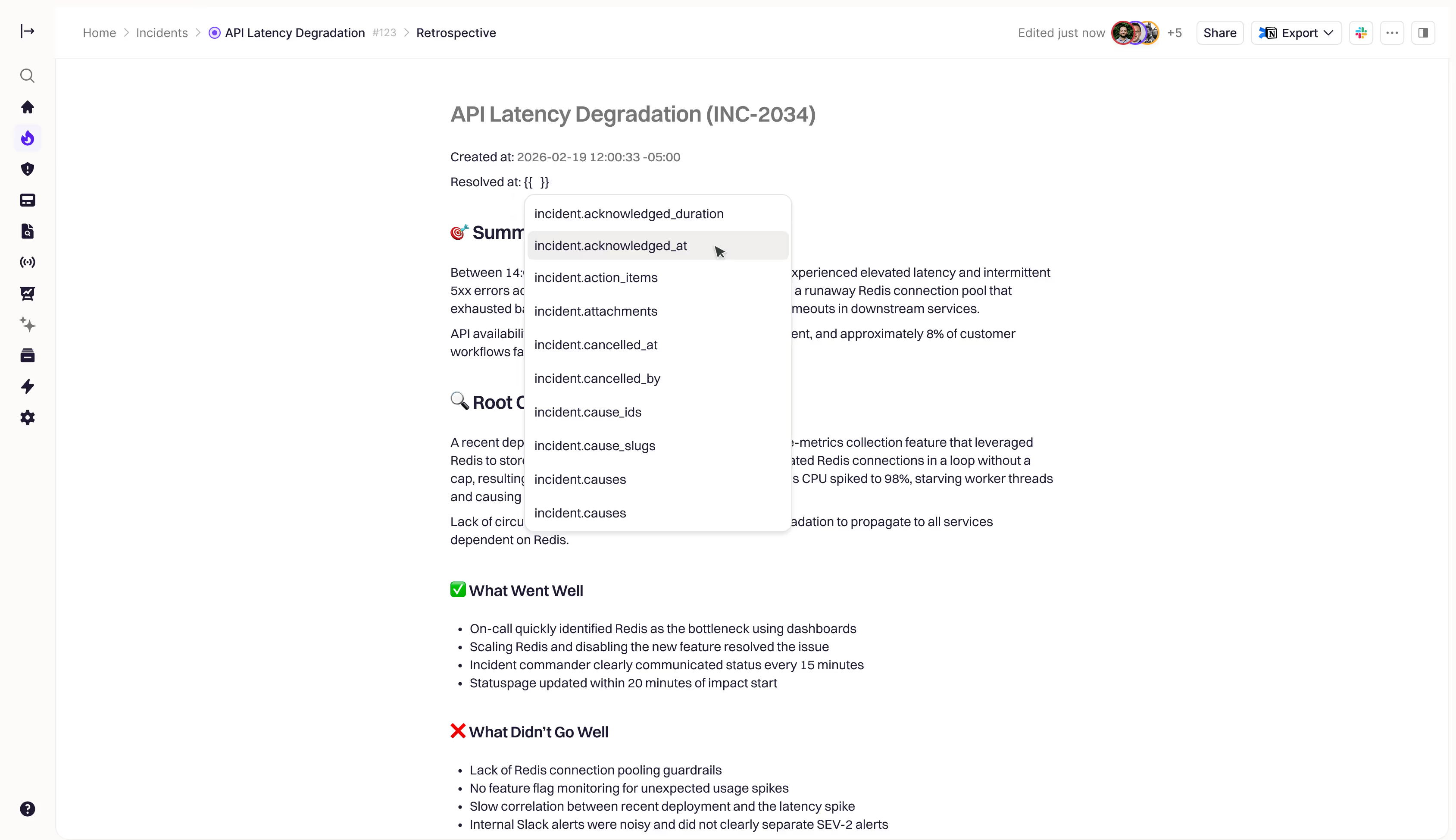
We built a "hydrated liquid variables" system that renders incident data as inline chips within the editor:
// hydrated_liquid_variable_extension.js
export const HydratedLiquidVariable = Node.create({
  name: "hydratedLiquidVariable",
  group: "inline",
  inline: true,
  atom: true,  // Backspace deletes entire chip

  addAttributes() {
    return {
      variable: "{{ incident.title }}",  // Persisted to HTML
      value: "Database Outage",          // Runtime display value
      loading: true                      // Loading state
    };
  }
});
The magic happens through ActionCable subscriptions that detect when incident data changes:
# liquid_variables_channel.rb
def self.broadcast_update(incident, source_model:, changed_attributes:)
  broadcast_to(incident, {
    event: "variables_updated",
    source_model: source_model,        # "Incident", "IncidentEvent"
    changed_attributes: changed_attributes,
    timestamp: Time.current.iso8601
  })
end
We optimized this by mapping changed attributes to affected variables. When an incident's severity changes, we only re-hydrate variables like {{ incident.severity }} and {{ incident.severity_normalized }}, not the entire document.
Enhanced Workflow Integration
Rootly already had a powerful workflow system that teams used to automate incident response - creating Slack channels, triggering PagerDuty alerts, opening Jira tickets.
The challenge was integrating these existing workflows with our new collaborative editor.
Rather than building a separate retrospective workflow system, we enhanced our existing Genius workflow platform to work seamlessly with the collaborative editor:
# genius_create_google_docs_page_task.rb
def perform(workflow_run:)
  incident = workflow_run.incident

  content = if collaborative_editor_enabled?(incident.team)
    incident.incident_retrospective&.content_html
  else
    render_template(incident)
  end

  client = GoogleDriveClient.new(team: team)
  doc = client.create_document(
    title: "Retrospective: #{incident.title}",
    content: process_html(content),
    parent_folder_id: config["parent_folder_id"]
  )

  # Store reference for future updates
  incident.update!(
    google_drive_id: doc.id,
    google_drive_url: doc.web_view_link
  )
end
Teams could now use their existing workflow configurations - which platforms to export to, which folders to use, what naming conventions to follow - with the new collaborative editor. This meant zero learning curve for workflow management while gaining all the benefits of real-time editing.
The integration supports both one-time exports and live syncing. Teams can set up workflows that automatically export retrospectives to Confluence when published, or create update workflows that sync changes back to Google Docs whenever the retrospective is modified.
Custom Editor Extensions for Incident Data
Incidents are dynamic, so standard rich text editing wouldn’t capture the whole picture. SRE teams needed to embed live incident timelines and follow-up action items directly in their retrospectives.
We built three custom editor extensions:
1. Timeline blocks that fetch and display incident events:
// timeline_node_extension.js
addCommands() {
  return {
    insertTimeline: (attrs = {}) => ({ commands }) => {
      return commands.insertContent({
        type: this.name,
        attrs: { includeSystemEvents: attrs.includeSystemEvents || false }
      });
    }
  };
}
Users type /timeline and get a live-updating list of incident events. The extension fetches data from /account/data_blocks/timeline and renders it within the document.
2. Followups blocks for action item management with sorting options (due date, status, priority).
3. Liquid blocks for complex templating with control flow (if/for/case statements).
AI-Powered Writing Assistance
We integrated AI writing assistance to help teams create better retrospectives faster. Our AI service provides intelligent writing suggestions and content generation capabilities:
# ai/text_editor.rb
class Ai::TextEditor
  def initialize(team:, text:, operation:)
    @team = team
    @text = text
    @operation = operation  # :fix_grammar, :shorten, :lengthen, :simplify
  end

  def process
    client = OpenAiClient.new(team: @team)
    client.chat(
      messages: build_messages,
      model: "model"
    )
  end
end
The AI integration handles seven writing operations: rephrase, fix grammar, shorten, extend, simplify, summarize, and generate TL;DR. Each streams responses in real-time with options that let users choose whether to apply the suggested changes.For complete retrospective generation, we built a specialized service that understands incident context:
# ai/incident_retrospective.rb
def generate
  prompt = build_prompt(
    incident_data: @incident.liquid_variables,
    template: @team.retrospective_templates.default&.content_html
  )

  OpenAiClient.new(team: @team).chat(
    messages: [{ role: "user", content: prompt }],
    model: "model"
  )
end
This creates an initial draft that incorporates the incident's timeline, affected services, and impact details. Teams can then collaboratively edit and refine the AI-generated content rather than starting from scratch. The AI understands Rootly's incident management context, so it generates retrospectives that follow best practices and include relevant technical details.
Export Everywhere: 8 Platform Integrations
Teams wanted their retrospectives in their existing documentation systems. We built export integrations for Confluence, Google Docs, Notion, SharePoint, Dropbox Paper, Coda, Quip, and Datadog.
Each provider has create and update tasks that run through our Genius workflow system:
The key challenge was converting our editor's HTML output to each platform's expected format. Google Docs needs specific markup, Confluence requires their storage format, and Notion expects block-based JSON.
Our workflow integration meant teams could configure these exports once and have them work automatically. A P0 incident might trigger exports to both Confluence (for engineering documentation) and Notion (for executive summaries), while a minor incident only creates a Google Doc in the team's folder.
The Results
Teams have given us incredibly positive feedback about the new retrospectives system. The real-time collaboration features eliminated "version conflicts" and "can you review the latest draft?" messages. Engineering managers particularly appreciate how the system integrates with their existing workflow configurations rather than requiring them to learn new export processes.
The quality of retrospectives has noticeably improved. AI-assisted writing and live incident data embedding means teams spend more time analyzing root causes and creating actionable follow-ups, rather than recreating timelines and basic incident facts.
Most importantly, teams report that the collaborative editing experience feels modern and responsive. The combination of real-time updates, threaded comments, and seamless workflow integration has made retrospective writing something teams look forward to rather than dread.
Building collaborative software is hard. Adding real-time features, AI assistance, and workflow automation makes it exponentially harder. But the combination of proven technologies (Y.js CRDTs), thoughtful UX design, and robust backend systems created something that teams genuinely enjoy using.
The retrospectives system demonstrates what becomes possible when you combine modern collaborative editing with domain-specific automation. Teams get the editing experience they expect from consumer tools, with the specialized features their incident management workflows require.
.png)